iPhone 15 Pro Complete Guide: Specs, Battery Health, Common Problems & Buying Advice
The iPhone 15 Pro is a compact Pro with USB-C and a useful three-camera system. Its appeal as a used purchase now depends on the individual phone: battery wear, display condition and repair history deserve as much attention as the A17 Pro chip.
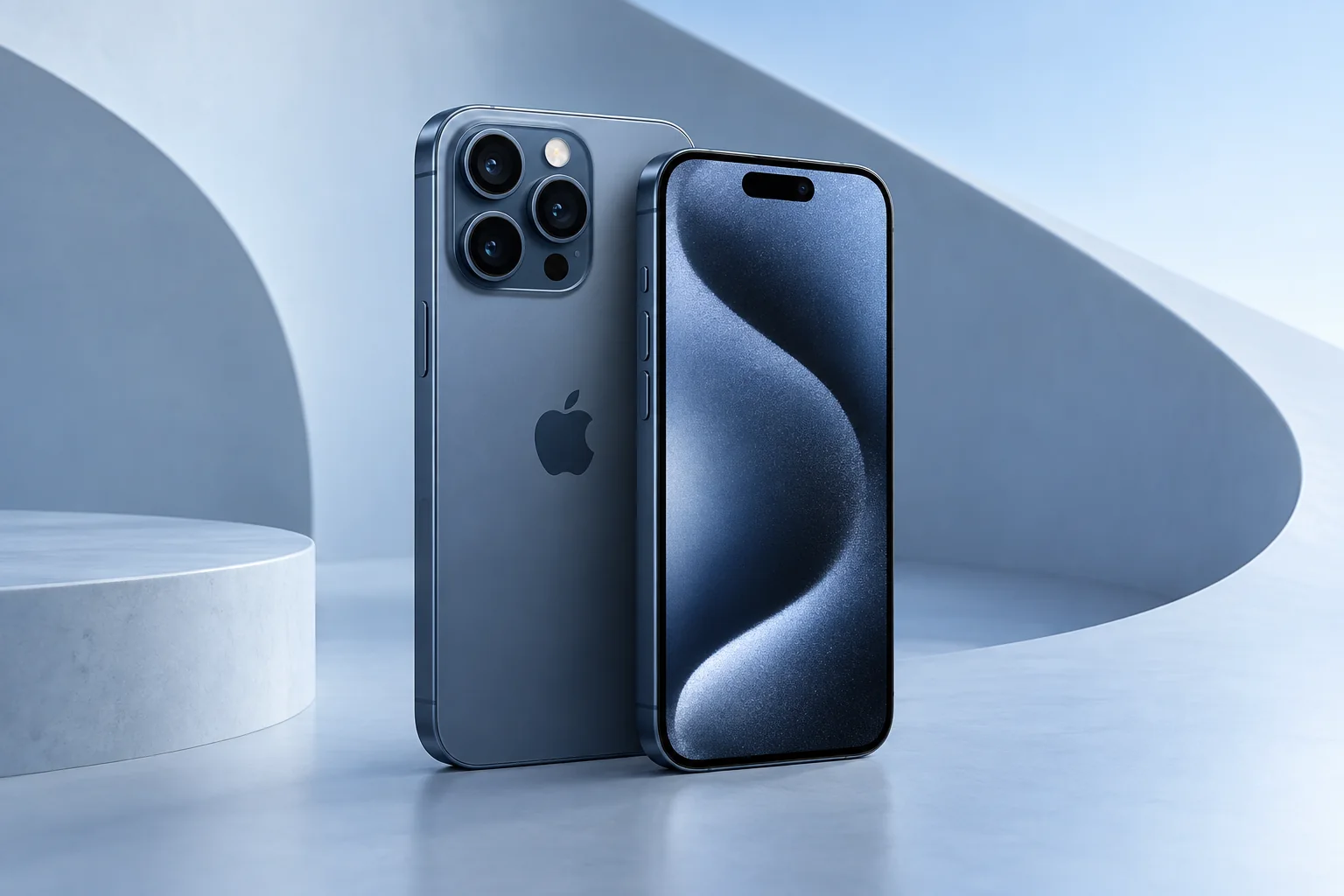
ϟ Quick Expert Summary
Consider the 15 Pro if you want ProMotion and a dedicated telephoto camera without a large handset. Be more cautious when a low asking price comes with an uncertain battery, damaged camera glass or missing ownership information. Existing owners with one repairable fault should compare a written repair estimate against the complete cost of changing phones.
Source-based editorial assessment; no hands-on testing or technician case history is claimed.
✓ Best For
- Buyers seeking a smaller Pro body
- People who use a 3x telephoto camera
- Owners considering a focused repair
× Not Ideal For
- Users wanting the largest display
- Buyers expecting a new battery in every used phone
- People who need the Pro Max 5x camera
Compact Pro
6.1-inch display
Triple camera
Dedicated 3x telephoto
USB-C
USB 3 capability
Titanium design
Glass still needs protection
Know the device.
Choose with confidence.
Camera, battery and repair considerations.
① Key Specifications
| Display | 6.1-inch Super Retina XDR OLED; ProMotion up to 120Hz |
|---|---|
| Chip | A17 Pro |
| Storage | 128GB / 256GB / 512GB / 1TB |
| Rear cameras | 48MP main; 12MP ultra wide; 12MP 3x telephoto |
| Front camera | 12MP TrueDepth |
| Weight | 187g |
| Connection | USB-C; USB 3 up to 10Gb/s with suitable cable |
| Build | Titanium design |
| Resistance | IP68 laboratory rating |
Manufacturer technical specifications
Manufacturer battery and charging tests are not FixUpPhone measurements or guarantees of your daily result.
② FixUpPhone Expert Analysis
The following is ownership and buying analysis based on the cited sources.
A sensible smaller Pro purchase
Start with why you want a Pro. Smooth scrolling, telephoto framing and advanced capture tools can matter, but none fixes a damaged second-hand device. Compare a clean 15 Pro against a newer standard iPhone with a clear return policy. The better purchase is the one that delivers your required features at the lower realistic ownership cost, not necessarily the older flagship.
Battery health needs context
Ask to see battery information in Settings and discuss any service message with the seller. A maximum-capacity percentage is useful context, not a promise of hours remaining. Navigation, poor cellular reception and camera recording can drain a phone differently from light messaging. If runtime is already inadequate, include a battery assessment in the purchase decision instead of assuming software alone will restore it.
Check the right telephoto expectation
The smaller 15 Pro has a 3x telephoto; it does not inherit the 15 Pro Max’s 5x lens. Test portrait-distance framing and distant detail separately. Inspect the lens covers under good light, and record a short sample using different views. A sharp-looking preview on one camera does not establish that every camera or stabilization function works properly.
USB-C does not make every cable equal
The phone supports a faster USB data mode, but a charging cable may not support the speed needed for large recordings. Check the cable’s data specification and the connected computer or storage device. If wired transfer is important, test that exact workflow before buying accessories. A port problem should be investigated with known-working equipment before attributing it to the handset.
Heat complaints need diagnosis
We do not treat online anecdotes as a measured failure rate. Record when unusual warmth occurs: initial setup, gaming, charging, camera work or idle use. Install appropriate software updates and inspect battery usage. Persistent warnings, shutdowns or a visibly distorted battery require service advice rather than repeated experiments. No FixUpPhone thermal benchmark is claimed in this guide.
Inspect repairs and ownership together
Review Parts and Service History where available, test Face ID and ensure the device can complete legitimate activation. Ask for repair paperwork and warranty terms in writing. An undocumented component is not automatically a diagnosis, but uncertainty should affect what you are willing to pay. Decline a purchase if the seller cannot demonstrate that account restrictions have been removed.
③ Pros & Cons
✓ Reasons to consider
- Smaller body with a ProMotion display
- Dedicated 3x telephoto
- USB-C with fast data capability
- Multiple storage choices
× Trade-offs
- Used battery condition varies
- No 5x lens on this smaller model
- Glass damage can add substantial cost
- Fast transfers require appropriate accessories
Ready to Buy? Check Latest Prices
Compare condition, storage, returns and any necessary service before comparing seller prices. Apple’s current store may not sell this older model; its link is a reference for current alternatives, not a claim of available stock.
Check available models and purchase terms
No affiliate links are used. Prices and stock can change; a current offer is not implied. Additional approved retailers can be added later.
④ Repairability & Common Repair Needs
Short runtime
Document battery usage and the circumstances of drain. Ask for assessment if a service message or unsuitable runtime persists; a generic battery-health claim is not a repair quote.
Display or camera damage
Separate cosmetic marks from touch faults, focus problems and broken protective glass. Request a scope that identifies the affected component and any required post-repair configuration.
Intermittent charging
Try a known-working compatible cable and adapter. Do not scrape the connector with metal objects. If the fault remains, have the port and associated circuitry assessed before authorizing parts.
Manufacturer service guidance · Request a repair assessment
These are diagnostic considerations, not a claim of model-wide defects. No repair price, parts grade, turnaround or warranty is guaranteed. Stop charging a visibly damaged or bulging battery; ask for safe handling advice and do not send it through ordinary mail.
Already Have This Device and Need a Repair?
Tell us what happened and choose a local store or a mail-in enquiry.
- Screen or touch concerns
- Battery and charging issues
- Back glass or camera damage
- Liquid-exposure assessment
Background: generated service illustration.
Mail-In Repair Service
Start with the repair request form and choose Mail-In Repair. The team needs to review your device and issue before providing shipping instructions and a repair quote.
Start Mail-In Repair →Request workflow only. Do not ship until the team confirms instructions. The form saves requests; email notifications and appointment scheduling are not yet enabled.
Prefer to visit? Find a repair location →How It Works
- BookSubmit your device and issue for review.
- ShipWait for confirmed packing and shipping instructions.
- Diagnose / RepairReview the assessment and approve the quoted work.
- ReturnAgree the return arrangements with the team.
⑤ Should You Buy It?
Keep the 15 Pro if it performs your daily tasks and a targeted repair can restore dependable use at a reasonable cost. Buy one used only when you can inspect it and understand the seller’s return terms. Move to a newer model for a specific capability you need, rather than treating the model year as an automatic expiration date.
Before paying, check storage, carrier compatibility, activation, Face ID, microphones, speakers, cameras and charging. Have the seller erase the device only through the proper ownership process. Back up your current phone and plan account transfers before handing it over for repair or trade-in.
Request a trade-in assessment →⑥ Alternatives & Comparison
Larger display and a different telephoto lens.
Explore option →Compare the next generation’s camera and size choices.
Explore option →Simpler camera setup may cover everyday needs.
Explore option →⑦ Accessories We Recommend
Choose the iPhone 15 Pro variation; confirm camera and button access before ordering.
Check case clearance and installation instructions. Protection is not a drop guarantee.
Verify its charging protocol, cable and safety information, not just the wattage printed on the box.
Review the exact model variation and confirmed product specifications in the shop.
⑧ Frequently Asked Questions
Does iPhone 15 Pro have the same zoom as Pro Max?
No. Apple’s specifications identify a 3x telephoto on 15 Pro and a 5x telephoto on 15 Pro Max. Do not buy the smaller phone assuming the lens is identical.
Is a lower battery-health reading a reason to replace the whole phone?
Not by itself. Consider actual runtime, safety, service messages, the rest of the device and a written battery-service estimate.
Is every USB-C cable suitable for fast data transfer?
No. The cable, connected device and port must support the required data mode; a cable sold mainly for charging may not.
Are overheating reports proof that this model is defective?
No. Anecdotes cannot establish a failure rate. Persistent abnormal symptoms on your own phone need investigation with the specific usage and software context.
Can FixUpPhone guarantee a repair price from this guide?
No. Use the repair request form for an assessment. Parts, scope and service terms must be confirmed for the device.
Sources & Editorial Notes
Prepared by FixUpPhone Editorial. Documentation checked September 17, 2026. Manufacturer specifications and test claims are separated from editorial analysis. No FixUpPhone physical testing, measured benchmarks or technician case history is claimed. The featured artwork is an original generated illustration, not a manufacturer photograph. No affiliate links or guaranteed service prices are included.
- iPhone 15 Pro specifications
- Manufacturer service guidance
- Apple Parts and Service History
- Apple Repair Assistant
- Apple temperature guidance
For corrections or device help, contact FixUpPhone.