iPhone Air Complete Guide: Specs, Features, Battery Life, Durability & Buying Advice
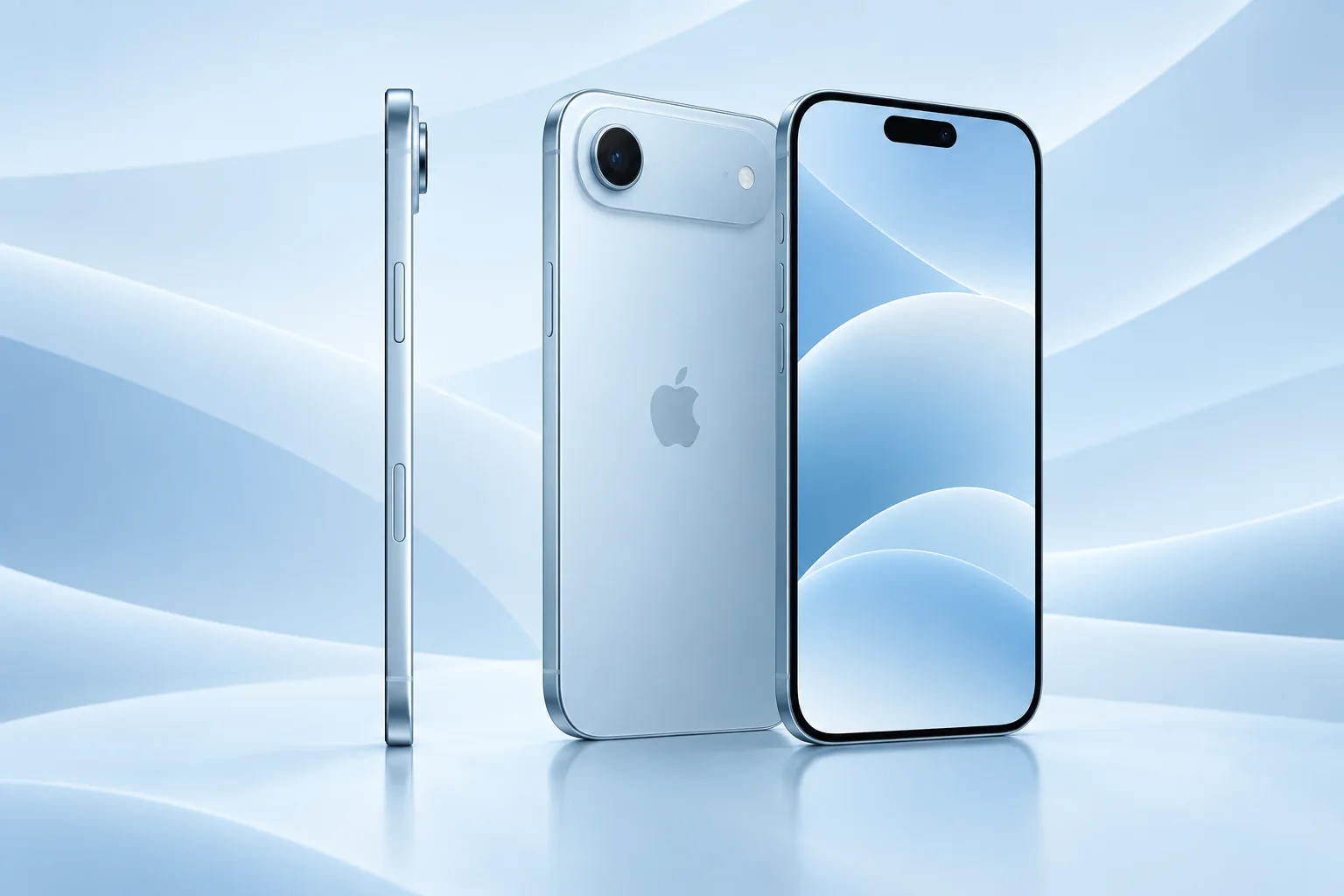
The iPhone Air is a choice about what you want to carry, not simply a cheaper or smaller Pro. This iPhone Air guide examines the appeal of a thin phone alongside its camera, charging and ownership compromises, with practical questions to answer before buying.
ϟ Quick Expert Summary
The Air is most compelling when a slim, light-feeling device is a daily priority and one main rear camera fits your photography. Its appeal becomes weaker if you immediately add bulky accessories to compensate for needs another model handles more naturally. Evaluate the phone together with your case, charging plan and carrier, rather than judging its thin profile in isolation.
Source-based editorial analysis, not hands-on testing or technician case history.
✓ Best For
- People prioritizing a slim carry
- Everyday main-camera photography
- Buyers comfortable with eSIM activation
× Not Ideal For
- Ultra-wide and long-lens photographers
- People who require physical SIM support
- Users choosing chiefly for maximum endurance
5.64mm
Manufacturer body depth
165g
Manufacturer weight
Single Rear Camera
48MP main system
6.5-inch OLED
Adaptive display
Know the device.
Choose with confidence.
Camera, battery and repair considerations.
① Key Specifications
| Display | 6.5-inch OLED; adaptive up to 120Hz |
|---|---|
| Chip | A19 Pro; 5-core GPU |
| Storage | 256GB / 512GB / 1TB |
| Rear camera | 48MP main; 2x optical-quality crop |
| Front camera | 18MP Center Stage |
| Body | Titanium; 5.64mm depth; 165g |
| Battery test | Up to 27 hours video playback |
| Wired charging test | Up to 50% in 30 minutes with 20W+ adapter |
| Wireless charging | MagSafe / Qi2 up to 20W |
| USB-C | USB 2 data speeds |
| SIM | eSIM; no physical SIM card |
| Resistance | IP68 laboratory rating |
Manufacturer technical specifications
Battery and charging figures are manufacturer test results, not FixUpPhone measurements. Current software and regional configurations may differ.
② FixUpPhone Expert Analysis
Practical ownership analysis based on the cited documentation.
Thinness & real-world handling
A thin body is attractive, but grip is personal. Hold the Air while reaching for the camera controls and typing your usual messages. Consider how much thickness your preferred case adds and whether an attached wallet changes the balance. Do not infer structural weakness or exceptional toughness from thinness alone: we have not performed bend or drop testing.
Screen & comfort
The screen offers substantial viewing space without making this a small-screen phone. Test reach to the top corners and readability at your normal text setting. A thin profile does not necessarily make a wide device easier to use with one hand. If accessibility is your main reason to upgrade, judge the screen with the relevant settings enabled.
One camera: decide what you would miss
Look through a week of your own photographs before deciding. If most use the normal field of view, the simpler rear system may suit you. If you often step back to fit a room or zoom toward wildlife, the missing extra viewpoints deserve more weight. A digital zoom control does not recreate the experience of a dedicated camera at every distance.
Battery & charging plan
The stated endurance is a manufacturer playback test. For a travel day, think about navigation, signal and camera use rather than extending that number into a personal promise. If you expect to carry an additional battery every day, compare the combined bulk and cost with another phone. Existing chargers should be checked for compatibility; a faster specification on an adapter cannot force the phone beyond its supported behavior.
Performance & file management
The chip name does not make every device sharing that family identical in every task. We have not measured sustained gaming, editing or thermal behavior. For large media transfers, check the connection speed and storage workflow before buying. A light phone is not automatically the best choice for someone who repeatedly moves large project files to a computer.
Durability, water & repairs
Choose protection for the exact Air model and inspect it after impacts. Water resistance is a laboratory characteristic, not permission to submerge a phone or ignore cracked glass. If the enclosure looks deformed, seek an assessment instead of trying to straighten it. Repair access, tools, adhesives and calibration are separate questions from how thin the phone appears.
eSIM and travel preparation
The absence of a physical SIM slot makes carrier preparation especially important. Before purchase, confirm that your carrier supports activation on the exact model and that you can transfer your number. Travelers should check the countries and plans they actually use, not assume an existing plastic travel SIM can simply be moved across.
③ Pros & Cons
✓ Reasons to consider
- Distinctively thin body
- Large high-refresh viewing area
- Simple everyday photography workflow
- Public model-specific service documentation
× Trade-offs
- Single rear viewpoint limits flexibility
- Physical SIM cannot be inserted
- Accessory bulk can reduce the thinness benefit
- Battery needs should be assessed realistically
Ready to Buy? Check Latest Prices
Compare the Air as a complete setup: phone, case, charging accessories and any carrier activation requirements. Check seller returns carefully if you have not handled one. On a used unit, inspect the frame, camera area and charging connection rather than buying from a front-screen photograph alone. Current stock and pricing should be checked at the official store.
Check available models and purchase terms
No affiliate links are used. Prices, availability and retailer terms can change; no live offer is implied.
④ Repairability & Common Repair Needs
Inspect the thin enclosure
Report any visible bending, separation or unusual gap after a fall. A display-only quote may be incomplete if the housing is also affected. The repairer needs to assess fit and function, not merely whether a replacement screen can light up. Never press a separating enclosure closed when battery swelling is possible.
Camera, charging and battery symptoms
With one rear camera, a focus or glass problem has a direct effect on everyday photography. Record whether blur changes with distance and lighting. For power complaints, describe the charger, cable, temperature and timing. These are diagnostic questions, not a statement that the Air has a widespread defect.
Documented service and calibration
Apple’s Air repair manual provides procedures for major components. That does not make thin-phone repair a safe improvisation. Ask which parts are proposed, whether calibration is required and what post-repair checks are included. Keep repair records so the next owner can understand the device history.
Manufacturer repair and support documentation · Request a repair assessment
These are possible repair needs, not claims of a model-wide defect. Request a written assessment; no repair price, parts grade, turnaround or warranty is guaranteed. Stop charging a visibly damaged or bulging battery and ask for safe handling advice; do not send it through ordinary mail.
Already Have This Device and Need a Repair?
Tell us what happened and choose a local store or a mail-in enquiry.
- Screen or touch concerns
- Battery and charging issues
- Back glass or camera damage
- Liquid-exposure assessment
Background: generated service illustration.
Mail-In Repair Service
Start with the repair request form and choose Mail-In Repair. The team needs to review your device and issue before providing shipping instructions and a repair quote.
Start Mail-In Repair →Request workflow only. Do not ship until the team confirms instructions. The form saves requests; email notifications and appointment scheduling are not yet enabled.
Prefer to visit? Find a repair location →How It Works
- BookSubmit your device and issue for review.
- ShipWait for confirmed packing and shipping instructions.
- Diagnose / RepairReview the assessment and approve the quoted work.
- ReturnAgree the return arrangements with the team.
⑤ Should You Buy It?
Buy the Air because you value how the complete device fits your daily life, after accepting the camera and SIM choices. Skip it when photography flexibility or avoiding external charging accessories matters more than thinness. If your existing phone is comfortable and only has a worn battery, compare a repair assessment before making a style-driven upgrade.
For a used Air, request clear photographs of the edges and camera plateau, confirm account-lock removal and verify eSIM activation eligibility. Check battery condition and any parts history. Arrange a return window long enough to test calls, data, cameras and charging on your own carrier.
Request a trade-in assessment →⑥ Alternatives & Comparison
Consider a dual-camera everyday alternative.
Explore option →Compare camera flexibility with your priorities.
Explore option →Address a specific fault before replacing everything.
Explore option →⑦ Accessories We Recommend
Choose the iPhone Air variation; confirm camera and button access before ordering.
Check case clearance and installation instructions. Protection is not a drop guarantee.
Verify its charging protocol, cable and safety information, not just the wattage printed on the box.
Review the exact model variation and confirmed product specifications in the shop.
⑧ Frequently Asked Questions
Is iPhone Air the same as a Pro with a thinner body?
No. Compare the complete specification and the tasks you use. Its single rear-camera system and other hardware choices make it a distinct product decision.
Can I insert a physical SIM?
Apple specifies eSIM and no physical SIM support for Air. Confirm carrier and travel-plan compatibility before buying.
Does thinness prove that it breaks easily?
No. We have no FixUpPhone bend or drop test data. Inspect condition, use suitable protection and avoid turning a design dimension into an unsupported durability claim.
Will the battery last 27 hours for me?
That figure is a controlled video-playback maximum. Your screen use, signal, applications and battery condition determine actual runtime.
Can I use it for ultra-wide photographs?
The listed rear system has one main camera. If ultra-wide framing is central to your photography, compare another model rather than assuming software zoom supplies the same viewpoint.
How do I request an Air repair?
Use the booking form with the exact model and symptoms. For mail-in service, wait for eligibility and shipping instructions before sending the device.
Sources & Editorial Notes
Prepared by FixUpPhone Editorial. Documentation checked September 17, 2026. Specifications and manufacturer test claims are distinguished from editorial recommendations. No FixUpPhone hands-on testing, measured benchmarks or technician case histories are claimed. Featured artwork is an original generated illustration. No affiliate links or guaranteed prices are included.
- iPhone Air specifications
- iPhone Air repair manual
- Apple Repair Assistant
- Apple Parts and Service History
- Apple temperature guidance
For corrections or device help, contact FixUpPhone.